Create an account
Purpose
The Créer un compte screen opens a new NervaGest workspace. It is meant for a company that does not have a workspace yet: it creates both the workspace and its first user.
Additional users of an existing workspace are not created here, but from Technical data → Users, by a workspace administrator.
Access
- Address:
/register— the screen is public, no sign-in is required. - From the web home page: the Créer un compte button at the top right, or the Pas encore de compte ? Créer un compte link under the sign-in form.
- From the sign-in screen: the Créer un compte link.
- From this documentation: the Créer un compte button in the navigation bar.
The screen
It follows the layout of the web home page: the pitch on the left, the form on the right. The language selector in the navigation bar changes the language of the screen; the Se connecter button leads back to the sign-in page.
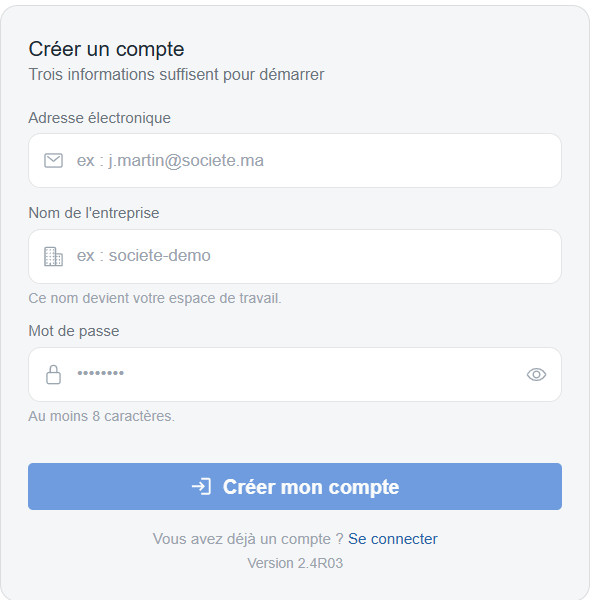
The account creation form, with its three fields and the Créer mon compte button.
Fields to fill in
| Field | Rule |
|---|---|
| Email address | Required. It becomes your sign-in Identifiant. |
| Company name | Required. It becomes your Espace (workspace): it is what you will type at every sign-in. |
| Password | Required, at least 8 characters. The eye icon reveals it. |
The Créer mon compte button stays inactive until all three fields are valid. A malformed address or a password that is too short is flagged under the field as you type.
It is the workspace code every user will have to type. Short and unambiguous, it will avoid sign-in mistakes.
During creation
An overlay covers the page with the message Création en cours… and a progress bar. Creation takes a few seconds: the workspace, its reference data and the first user are set up.
Once the account is created
The form gives way to a confirmation: Votre compte est créé, with the workspace name and the email address to use.
The server may normalise the name entered — case, spaces, special characters. The name shown in the confirmation is the one that counts: that is the Espace code to remember.
The Se connecter button opens the sign-in page with the Espace and the Identifiant already filled in; only the password is left to type.
Messages and troubleshooting
| Message | Cause | What to do |
|---|---|---|
| Adresse électronique invalide. | The address format is not recognised. | Check the entry (name@domain.ext). |
| Le mot de passe doit compter au moins 8 caractères. | Password too short. | Use a longer password. |
| Ce nom d'entreprise est déjà utilisé. | A workspace already has that name. | Choose another name, or sign in to the existing workspace. |
| Cette adresse électronique est déjà associée à un compte. | The address is already known. | Sign in, or use Managing your password if the password is forgotten. |
| La création du compte a échoué. | Server or network error. | Try again; if the message persists, contact support. |
See also
- Signing in — the first sign-in to the workspace created.
- Managing your password — forgotten password or password change.
- Technical data → Users — adding other users to the workspace.